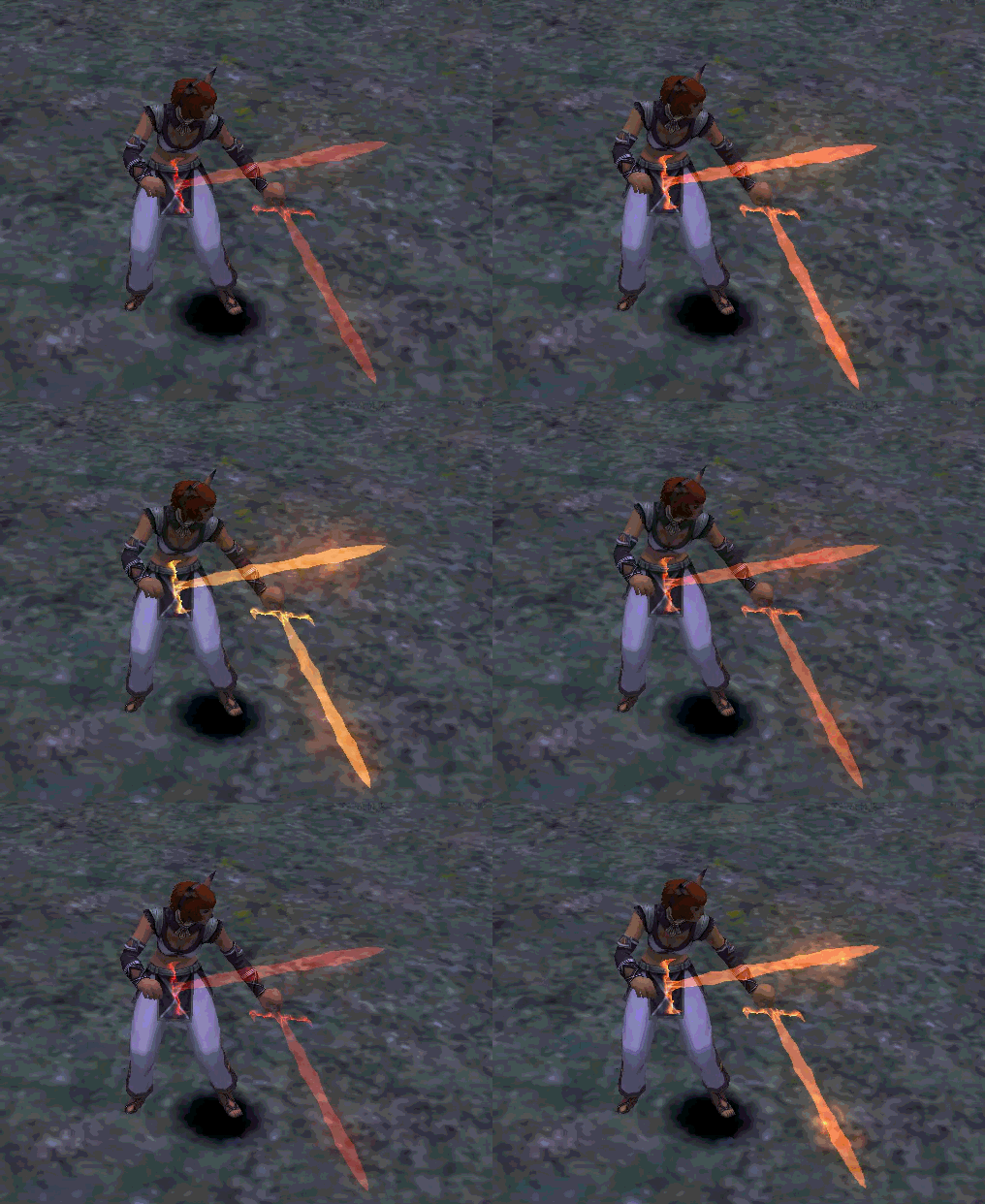
Here's a few sample images & a quick video:
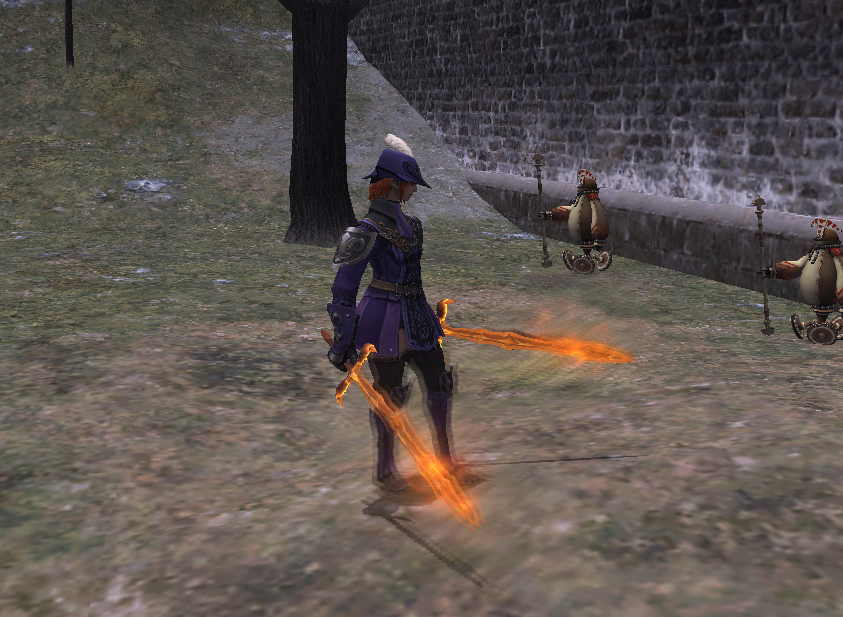
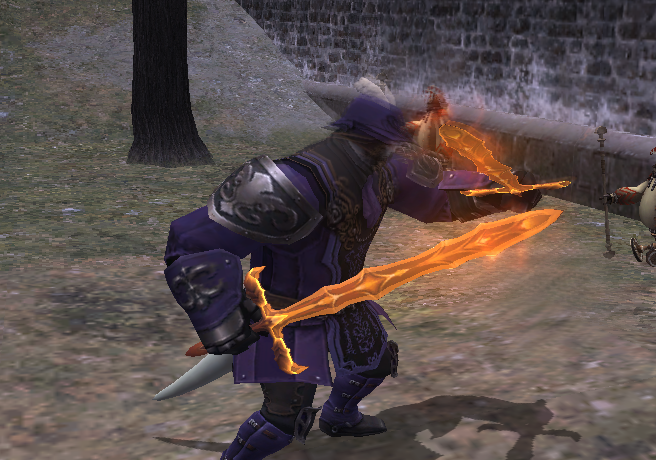
YouTube Video Placeholder
Firetongue Particle Mod |
||
|
Firetongue particle mod
Hello - I added some particle effects to the Firetongue model. The .DAT files are available here (all races, main-hand and off-hand). Please let me know if you encounter any issues, or have any questions.
Here's a few sample images & a quick video: YouTube Video Placeholder
[+]


Nice one, shoulda made an offhand with ice effect like the ER boss!
[+]

Okay this is sick! How did you do this?? I haven't seen a weapon VFX mod in years, very curious on the process
I have not been interested in mods because I think a lot of them cause performance issues (mostly around zone-loading) ....but, this is actually really cool. Thank you for sharing it.
Personally, I wish SE would do more with weapon appearances to make them stand out like this. I feel the same way about additional effects, too. How long did you take you to make this mod? ...Can you add Sagasinger's dark-glow to guttler? ...Asking for a friend. >.>;
[+]
Bahamut.Daleterrence said: » How did you do this?? I haven't seen a weapon VFX mod in years, very curious on the process To make the weapon "glow" - I wrote some code to convert the weapon's original mesh into a particle-mesh. The code also adjusts the particle-mesh's scale (to make it slightly larger than the original) and UV coordinates (to make the bottom half of the hilt transparent). That mesh is used in a particle-generator that varies colour over time - it ends up looking like this when the weapon is hidden: I used the same particle-mesh for all races. The offset/scaling needed to be fine-tuned for some races, so I adjusted the particle-generator's parameters slightly. The fire & distortion effects were copied from Router. I only adjusted the position & position-variance parameters so that the particles spawn along the blade. These effects are attached to the [!w01] routine, which is invoked when the actor displays as "engaged". They're disabled by the [!w00] (on-initialize) and [!w02] (on-disengage) routines. Those three routines are for the main-hand - the off-hand uses [!w10], [!w11], and [!w12]. The "on-hit" effects uses a copy of the fire particle-generator that emits at a faster rate. This is attached to the [skaz] routine (main-hand regular auto-attack) and [skal] routine (off-hand regular auto-attack). The actual modification of the .DAT files was done by hand, using a hex editor. I used some code to copy modifications from one race to the others, though. I displayed the effect in Xim to get it roughly how I wanted it, and then fine-tuned it in the real client. Felgarr said: » Personally, I wish SE would do more with weapon appearances to make them stand out like this. I feel the same way about additional effects, too. Same - I was hoping that all of the Bonanza weapons would have a pulse effect (or at least that the reforged ones would). Felgarr said: » How long did you take you to make this mod? ...Can you add Sagasinger's dark-glow to guttler? This mod took about ~3 hours to make, and another hour or so for testing (I made a few sloppy mistakes that resulted in the client crashing...). Sagasinger's effect is pretty simple - I can take a look when I feel like procrastinating again :)
[+]
Asura.Aamace said: » Bahamut.Daleterrence said: » How did you do this?? I haven't seen a weapon VFX mod in years, very curious on the process To make the weapon "glow" - I wrote some code to convert the weapon's original mesh into a particle-mesh. The code also adjusts the particle-mesh's scale (to make it slightly larger than the original) and UV coordinates (to make the bottom half of the hilt transparent). That mesh is used in a particle-generator that varies colour over time - it ends up looking like this when the weapon is hidden: I used the same particle-mesh for all races. The offset/scaling needed to be fine-tuned for some races, so I adjusted the particle-generator's parameters slightly. The fire & distortion effects were copied from Router. I only adjusted the position & position-variance parameters so that the particles spawn along the blade. These effects are attached to the [!w01] routine, which is invoked when the actor displays as "engaged". They're disabled by the [!w00] (on-initialize) and [!w02] (on-disengage) routines. Those three routines are for the main-hand - the off-hand uses [!w10], [!w11], and [!w12]. The "on-hit" effects uses a copy of the fire particle-generator that emits at a faster rate. This is attached to the [skaz] routine (main-hand regular auto-attack) and [skal] routine (off-hand regular auto-attack). The actual modification of the .DAT files was done by hand, using a hex editor. I used some code to copy modifications from one race to the others, though. I displayed the effect in Xim to get it roughly how I wanted it, and then fine-tuned it in the real client. It genuinely makes me so happy people are still making mods like this, it's actually so damn cool, if you ever feel like it, I'd love to see some guides or things of that nature really guiding us through the process, we don't really have anything like that any more sadly and it'd be wonderful to be able to point people towards something solid from someone knowledgeable! (thank you for XIM btw you absolutely rock)
[+]
When I and others do this kind of stuff it's all done purely in hex editing and we just kitbash effects and modify size/placement as much as is possible. There are no tools to convert the basic mesh into a particle mesh, edit existing ones or make new ones so that's something nobody has done before from a modding perspective I believe, at best all we have is VRS to edit things.
I'm assuming you're a professional coder, and not just a hobbyist? You just kind of came from nowhere, made a version of XI for a web browser and know all this detailed information on how everything is put together! btw if you have that tool, can you make a mesh for Selh'teus wings that are semi transparent instead of solid?
[+]

Bahamut.Daleterrence said: » I'd love to see some guides or things of that nature really guiding us through the process Sure! I'll try to take more thorough notes next time I mod something. RadialArcana said: » I'm assuming you're a professional coder, and not just a hobbyist? Yep, though my professional experience is unrelated to graphics/reverse-engineering/game-dev. Xim was my first experience with graphics & game-dev, but I have a longer history with reverse-engineering. RadialArcana said: » btw if you have that tool, can you make a mesh for Selh'teus wings that are semi transparent instead of solid? To the best of my knowledge, it's not possible to do this (in a 1:1 way, at least). The main issues are: 1. Skeleton-meshes don't support alpha-blending, so the wings do need to be converted to particles 2. However, his wings contain skinned vertices (attached to multiple joints), and there's no particle-type that supports this 3. Even if it worked, his red-outline effect only applies to the skeleton-meshes, so his wings wouldn't be outlined anymore A potential solution would be to pre-compute the vertex positions (maybe based on his t-pose), and use those to create static wing meshes that can be used for the particles. This would prevent the wings from curling/flapping naturally, though, and probably look pretty stiff. (As an aside on point 1 - actor opacity can be adjusted, but it can only be done to the entire actor, not individual meshes. Translucent actors are drawn in a 2-step process, where the actor is first drawn normally to a separate texture-surface, and then drawn as a translucent quad to the main-surface.)
[+]

these are nice are you going to be making more wep mods!!!
|
||
|
All FFXI content and images © 2002-2026 SQUARE ENIX CO., LTD. FINAL
FANTASY is a registered trademark of Square Enix Co., Ltd.
|
||