|
|
Morbid Mogblade / XimTool
 Asura.Aamace Asura.Aamace
Server: Asura
Game: FFXI
Posts: 41
By Asura.Aamace 2026-04-23 17:50:58
Hello - as a proof-of-concept, I tried porting the Morbid Mogblade from FFXIV, and adding a basic particle effect to it. The .DAT files are available here.
YouTube Video Placeholder
My process for creating the mod was:
Used "FFXIV TexTools" to export the Morbid Mogblade model as .obj & textures as .dds (DXT1)
Used Blender to split the .obj file into specular/matte models, and create a simplified model for the particle effect.
Wrote some code that converts the resources into FFXI types, configures the particle effect, and overwrites an in-game item.
In the FFXI client, unequip and equip the item to reload the model
Here's a link to that code. It's not robust at the moment (the .obj parser is particularly bad), but it was able to create this mod without any need for hex-editing.
If you'd like to try running the code, I'd recommend using IntelliJ IDEA (since it's kotlin). The MogbladeMod is currently configured to overwrite "Bronze Sword" (but also generates backups, and contains a utility to restore from the backups). For example, you could experiment with the `ColorInitializer` to change the color of the particle.
As always, please feel free to ask any questions.
Some notes about the code:
If you like the sword, but not the particle effect, then simply removing this line is sufficient.
It uses "Bronze Sword" as a base, since it has the appropriate sound-effects & I had a couple in my inventory.
I plan to port/rewrite the tools I used for the Firetongue mod, including the one that translates from Skeleton-mesh to Particle-mesh
If you're curious about the internals of the tool, I'd recommend cross-referencing with Xim's source code. A lot of this was just copied over, and is the "write" counterpart to Xim's "read" functionality.
Missing Particle/Routine functionality is easy to implement (as long as it is understood in Xim)
Ideally, there'd be a GUI, but that's a long ways away.
Some notes about porting from FFXIV:
The port will never be 1:1, but for rigid models (attached to only a single joint), it's not too bad. FFXIV models use normal/specular textures, which FFXI doesn't support, so there's some workarounds with the diffuse texture & specular material settings.
I think FFXIV models have various LoDs, so it should be possible to use one of the simpler models in order to reduce triangle-count (but I couldn't figure out how to export them from TexTools)
Similarly, TexTools supports exporting the various mipmap levels, so those can be used to reduce texture size
For skinned models (ie: armor), I imagine it's not feasible to port, but I haven't looked into how FFXIV implements them.
By alloy 2026-04-23 20:14:40
This is the holly grail lol, just a simple way of modding actual item meshes would be sweet
[+]


By Tarage 2026-04-23 23:30:23
You have unleashed so many *** swords...
Server: Bahamut
Game: FFXI
Posts: 114
By Bahamut.Daleterrence 2026-04-24 06:24:05
This is absolutely incredible! I know a lot of people who will absolutely lose their damn minds over this, especially once it's had a bit of polish.
You've done it again, Aamace, top-tier work as always!
[+]

Asura.Aamace
Server: Asura
Game: FFXI
Posts: 41
By Asura.Aamace 2026-04-25 13:17:38
I've added the fire-glow mod to the tool. The script performs the same steps that I did manually here. The overall flow of the tool is:
Load the needed .DAT files. This provides access to the root-directory of the DAT file, which can be used to access its resources.
Modify the resources/directories as desired. Currently, there's (limited) support for Particle Generators, Effect Routines, Skeleton Meshes, Particle Meshes, and Key-frame Configurations.
Write the modified DAT-structures out to the destination file.
This is the part of the tool that converts the skeleton-mesh into a particle-mesh.
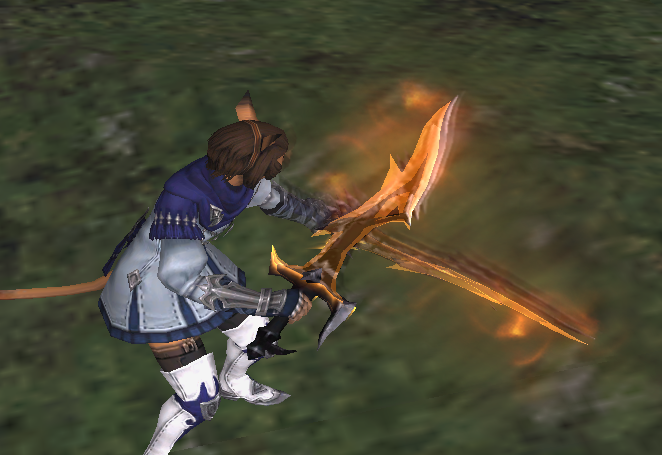
Since the mod doesn't really depend on the base-model, the effect can be applied to most swords (by changing baseModelId). For example, here's the effect applied to the Ark Saber:
just a simple way of modding actual item meshes would be sweet
I think I'll look into adding better import/export support at some point. I'm not sure it'll be .obj, but I'll try to choose something that works well with Blender.
[+]

 Quetzalcoatl.Darthjohnboy Quetzalcoatl.Darthjohnboy
Server: Quetzalcoatl
Game: FFXI
Posts: 42
By Quetzalcoatl.Darthjohnboy 2026-04-26 07:09:36
So in theory we could import weapon/armor models from xiv, or add glow effects to any weapon?
This is pretty awesome
Server: Bahamut
Game: FFXI
Posts: 114
By Bahamut.Daleterrence 2026-04-27 12:01:54
Quetzalcoatl.Darthjohnboy said: »So in theory we could import weapon/armor models from xiv, or add glow effects to any weapon?
This is pretty awesome
Weapons, yes, they very much work, I managed to import Curtana with minimal fuss, whilst it's not perfect (mainly due to my own inexperience), it definitely worked.

Armour is a much more complicated matter, because racial models in XIV are not even close to 1:1 with XI models, and armour in XIV is made up of many different 3D pieces in a lot of cases, which XI does not support at all, and if you flattened the texture, it's not going to look pretty. It's definitely somewhat possible, but it would require considerably more effort than a weapon which just needs to attach to a single-joint like your character's main or off hand. (Aamace can definitely give a better answer than this because they are a talented wizard and I don't know jack in comparison)
Asura.Aamace
Server: Asura
Game: FFXI
Posts: 41
By Asura.Aamace 2026-04-29 14:46:02
Bahamut.Daleterrence said: »It's definitely somewhat possible, but it would require considerably more effort than a weapon which just needs to attach to a single-joint like your character's main or off hand.
Yep, that's how I would summarize it as well (though FFXI does support models that contain multiple meshes).
I experimented with porting over a part of the Bunny Bustier from FFXIV. Here's a clip of my first attempt. I'm a beginner at Blender, so it's pretty messed up (clipping, bad weights, etc), but I think it shows that someone with 3D modelling experience could do a reasonably good port in this case.
I'll try to publish the tool for this shortly, but the workflow is essentially:
A tool that exports a skeleton-mesh (alongside the appropriate skeleton, textures, etc) to a glTF file.
Use Blender to import the glTF file, modify the mesh (vertices, weights, etc) however you like (within the limits of FFXI's engine).
Export from Blender as glTF (with a few specific configurations).
A tool that imports skeleton-meshes from a glTF file, and writes a FFXI .DAT file
By alloy 2026-04-29 19:30:31
This 1,000,000% lmao
 Fenrir.Jinxs Fenrir.Jinxs
Server: Fenrir
Game: FFXI
Posts: 1200
By Fenrir.Jinxs 2026-04-30 08:28:35
Real question is when are we getting something like the 14 mod that links peoples mods together for better or worse, so I can see these and maybe people that feel like being taru's for the day
Server: Bahamut
Game: FFXI
Posts: 114
By Bahamut.Daleterrence 2026-04-30 09:39:54
Real question is when are we getting something like the 14 mod that links peoples mods together for better or worse, so I can see these and maybe people that feel like being taru's for the day
I'd genuinely love something like what was Mare Synchronous (before SE shut it down, I'm aware forks of it exist now but yeah) but I'm not sure it's even possible. You could probably do it for anything vanilla in the game with packet injection, same way DressUp does it currently, with a service external to the game acting as the manager to keep everyone's appearance updated and correct, but loading a mod onto a specific person and only that person would be.. tricky, I'm betting, if it's even possible at all with how XI loads DATs. I'd love to hear opinions on this from those within the community intimately familiar with FFXI's inner workings though, not gonna lie.
Fenrir.Jinxs
Server: Fenrir
Game: FFXI
Posts: 1200
By Fenrir.Jinxs 2026-04-30 13:27:00
I bet someone can take the code form that addon's github and pair it with some code for xipivot
then a way would need to be invented to handle user specific dat swaps
probably a whitelist/blacklist feature
Would be really cool if it somehow doubled as a dat repo
By Heals 2026-04-30 14:00:49
Problem being pivot does full DAT swapping at the lowest level.
So if you have two players with, let's say model swaps, and those models happen to reside in the same DAT you get a collision on either side if you try to somehow sync the mods.
(You already have collisions as is but that's why I have the mod order in pivot so the user can decide which mod they want to win)
You'd probably have to go the same way it's done on XIV and instead of hooking the low-level DAT loading hook into the high-level model loading code and intercept/replace at that level.
[+]

By RadialArcana 2026-04-30 14:16:32
Heals is there any way to add to add a feature to XIpivot so that the user can have a custom / only for them head mod? Currently if you have a modded head dat, it shows for anyone else using that too.
I'm guessing not, but thought I would ask.
Asura.Aamace
Server: Asura
Game: FFXI
Posts: 41
By Asura.Aamace 2026-05-01 10:53:38
I've added (limited) glTF export/import functionality to XimTools. The source-code is available here, and an executable .jar file can be downloaded here (requires a recent version of the JDK to be installed).
Currently, it supports:
Exporting skeletons, skeleton meshes, skeleton animations, DDS textures (DXT1/DXT3)
Importing skeleton meshes, DDS textures (DXT1/DXT3)
Note that this is a minimum viable product. Not all meshes/animations are supported, and the UX is pretty rough. Please let me know if you encounter any issues.
Here's the process for exporting a mesh, loading it into Blender, exporting it from Blender, and re-importing it to FFXI.
Server: Bahamut
Game: FFXI
Posts: 114
By Bahamut.Daleterrence 2026-05-01 11:12:43
A guide too!?
This is bloody amazing, I gotta say, thank you for your efforts.
[+]

By alloy 2026-05-01 13:30:28
Will definitely try this once I get home later today
Quetzalcoatl.Darthjohnboy
Server: Quetzalcoatl
Game: FFXI
Posts: 42
By Quetzalcoatl.Darthjohnboy 2026-05-03 06:46:29
Wish I had some time working in blender, I managed so far to import my model from 14 and export from blender but xim tosses an error when I try to import it. Just missing some step, guess I have a new thing to learn while I have some downtime. You know of any good resources for someone just starting out?
Asura.Aamace
Server: Asura
Game: FFXI
Posts: 41
By Asura.Aamace 2026-05-03 10:28:48
Quetzalcoatl.Darthjohnboy said: »Wish I had some time working in blender, I managed so far to import my model from 14 and export from blender but xim tosses an error when I try to import it. Just missing some step, guess I have a new thing to learn while I have some downtime. You know of any good resources for someone just starting out?
The steps I took with the Bunny Bustier were:
Import the XIV model and Mithra Body 0
Rotate the XIV model so that it lines up with the XI model
Pose the XIV model (rotate the shoulders) so that the arms align in the T-pose
Delete the skin meshes from the XIV model, keeping the clothing meshes
Scale the XIV model so that the clothing fits on top of the XI model
Remove the XIV model's skeleton, assign the XI skeleton to the XIV model using "empty groups" (no weights assigned to any vertex)
Copy the vertex weights from the XI model to the XIV model. This ensures that the vertices will only have at most 2 weights.
Delete the portions of the XI model that are fully obscured by clothes, and connect vertices / scale the model to prevent clipping in other places. Fix any weirdly assigned weights.
Add the "Custom Properties" to the imported mesh (described in the guide). I used NVidia Texture Tools to convert the diffuse PNG texture to a DXT1 with alpha (BC1a), and placed it in the working directory.
I'm a beginner as well, so if there's some tool that would simplify this process, that would be fantastic.
[+]

By alloy 2026-05-03 17:46:26
All the meshes i export load upside down on every tool i have that can load gltf. Also this is amazing. :D
[+]
Asura.Aamace
Server: Asura
Game: FFXI
Posts: 41
By Asura.Aamace 2026-05-04 16:06:02
I've added basic support for NPC models & PC skeletal animations.
Blender seems to handle scaling transforms differently than FFXI does, so animations that scale non-leaf nodes will display incorrectly. I think PC animations don't scale non-leaf nodes, but I'll have to look into how to address this for NPCs.
All the meshes i export load upside down on every tool i have that can load gltf. Also this is amazing. :D
I added a Y-Flip option in Export :)
[+]
By RadialArcana 2026-05-04 18:08:12
Aren't the normal models in the dat files (for most things) half models, and the engine flips them to create the full model?
When you import them, I guess it's importing a full model?
By alloy 2026-05-04 19:49:20
Asymmetric models are pretty common in the game, mirrored textures are the real ram savers, the meshes don't really take much memory but are heavy on computational resources when drawing thats why they are heavily optimized for low polycounts. Same reason why there's a limit on how many pc/npc models can be onscreen at the same time.
I've added basic support for NPC models & PC skeletal animations.
Blender seems to handle scaling transforms differently than FFXI does, so animations that scale non-leaf nodes will display incorrectly. I think PC animations don't scale non-leaf nodes, but I'll have to look into how to address this for NPCs.
All the meshes i export load upside down on every tool i have that can load gltf. Also this is amazing. :D
I added a Y-Flip option in Export :)
This means animation editing?? D:
Hello - as a proof-of-concept, I tried porting the Morbid Mogblade from FFXIV, and adding a basic particle effect to it. The .DAT files are available here.
YouTube Video Placeholder
My process for creating the mod was:
Used "FFXIV TexTools" to export the Morbid Mogblade model as .obj & textures as .dds (DXT1)
Used Blender to split the .obj file into specular/matte models, and create a simplified model for the particle effect.
Wrote some code that converts the resources into FFXI types, configures the particle effect, and overwrites an in-game item.
In the FFXI client, unequip and equip the item to reload the model
Here's a link to that code. It's not robust at the moment (the .obj parser is particularly bad), but it was able to create this mod without any need for hex-editing.
If you'd like to try running the code, I'd recommend using IntelliJ IDEA (since it's kotlin). The MogbladeMod is currently configured to overwrite "Bronze Sword" (but also generates backups, and contains a utility to restore from the backups). For example, you could experiment with the `ColorInitializer` to change the color of the particle.
As always, please feel free to ask any questions.
Some notes about the code:
If you like the sword, but not the particle effect, then simply removing this line is sufficient.
It uses "Bronze Sword" as a base, since it has the appropriate sound-effects & I had a couple in my inventory.
I plan to port/rewrite the tools I used for the Firetongue mod, including the one that translates from Skeleton-mesh to Particle-mesh
If you're curious about the internals of the tool, I'd recommend cross-referencing with Xim's source code. A lot of this was just copied over, and is the "write" counterpart to Xim's "read" functionality.
Missing Particle/Routine functionality is easy to implement (as long as it is understood in Xim)
Ideally, there'd be a GUI, but that's a long ways away.
Some notes about porting from FFXIV:
The port will never be 1:1, but for rigid models (attached to only a single joint), it's not too bad. FFXIV models use normal/specular textures, which FFXI doesn't support, so there's some workarounds with the diffuse texture & specular material settings.
I think FFXIV models have various LoDs, so it should be possible to use one of the simpler models in order to reduce triangle-count (but I couldn't figure out how to export them from TexTools)
Similarly, TexTools supports exporting the various mipmap levels, so those can be used to reduce texture size
For skinned models (ie: armor), I imagine it's not feasible to port, but I haven't looked into how FFXIV implements them.
|
|