|
|
Xim: Browser-based Client Simulator
Server: Bahamut
Game: FFXI
Posts: 114
By Bahamut.Daleterrence 2026-04-22 17:43:01
Thinner would be better then yeah if that's the case. Does the effect look the same on everything (outside of the color)?
Atomos Abyssea entrance, moogles, avatars, trusts etc
I see now why you say you worry about performance, if that's what it needs for every instance of the effect.
It differs slightly depending on the actor and SE's intention for the effect (for example, the effect on the Fenrir mount is entirely different from Fenrir itself), but Aamace has once again been an absolute hero and given me some direction on how I might be able to remedy it, which I'll give a go tomorrow.
(Also this will probably be the last post about it in this thread because I really don't want to detract from XIM, it's genuinely a work of art and I don't want to derail from it!)
[+]

 Asura.Aamace Asura.Aamace
Server: Asura
Game: FFXI
Posts: 41
By Asura.Aamace 2026-04-23 11:12:00
I notice you fixed the ethereal glow around certain characters
Just to quickly answer how this works in Xim - I used 512x512 instead of 256x256 for the "haze"/"distortion" texture. I also eye-balled the blur-radius, since it works strangely in the retail client (it seems to use some kind of screen-space unit, and it's heavily impacted by the camera's FoV from zooming in/out).
To be honest, I didn't know the effect looked better on PS2 - I had just assumed it was meant to look kind of blocky...
Also, here's the retail client's blur-effect in motion as an example (~10x radius, opacity set to full).
Bahamut.Daleterrence said: »Also this will probably be the last post about it in this thread because I really don't want to detract from XIM
Please do feel free to ask any other .DAT or graphics-related questions, though!
[+]

Server: Bahamut
Game: FFXI
Posts: 114
By Bahamut.Daleterrence 2026-04-23 15:26:02
Bahamut.Daleterrence said: »Also this will probably be the last post about it in this thread because I really don't want to detract from XIM
Please do feel free to ask any other .DAT or graphics-related questions, though!
Oh I absolutely will, don't you worry! I spent nearly a day banging my head against the fix for the summoning circles and in one short conversation with you I'd worked out what I missed, you're being a massive help and I will continue to pick your brain :D
For everyone else, this isn't the best picture buuuuut, this is basically as close as I can get the circles to their original implementation. 
This is cross-referenced with LOTS of grainy 240p gameplay from back in the day, the fix is two parts, firstly the camera zoom causing the effect to stretch or shrink (when this bug was introduced, I have no idea, but it's not intentional behaviour) and secondly they are appropriately aspected for their position in world space, instead of appearing as strange ovals.
Asura.Aamace
Server: Asura
Game: FFXI
Posts: 41
By Asura.Aamace 2026-05-01 12:14:05
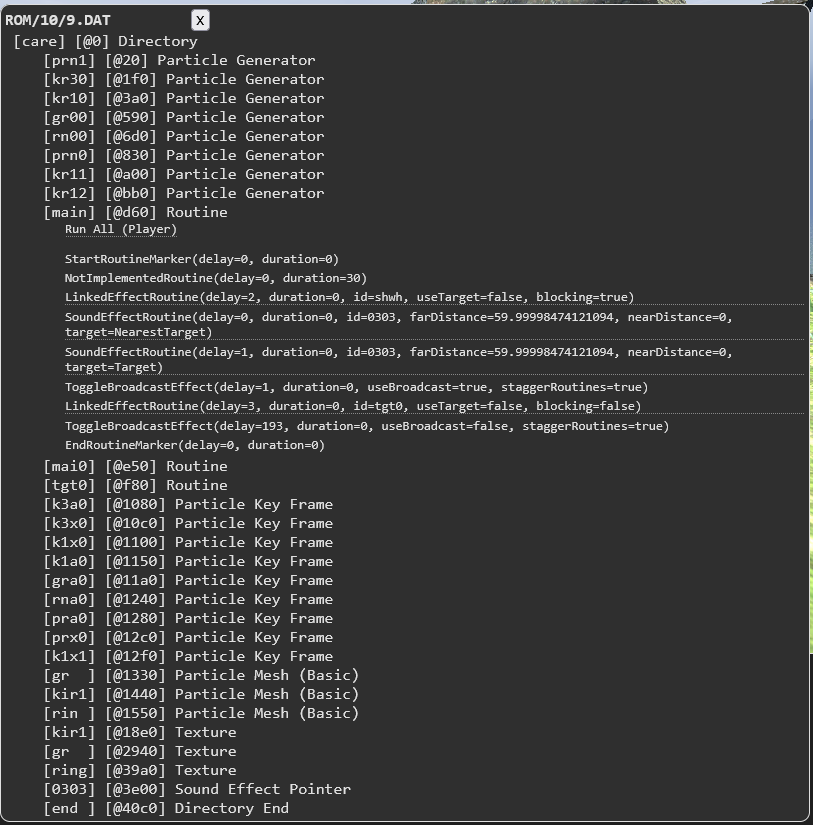
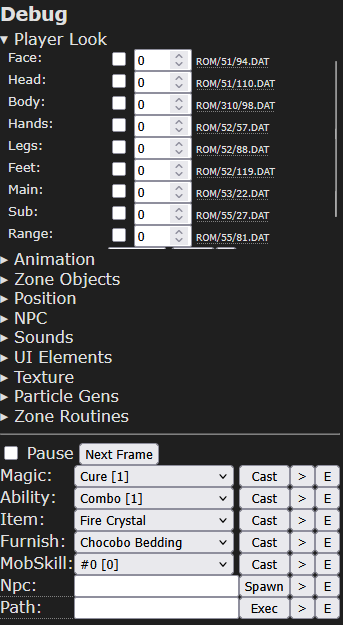
I added a small utility to display the .DAT tree for resources. It has basic functionality to describe some of the resource types, can execute Routine resources, play sounds, and display textures. The "E" buttons and player-look paths will open the UI:
For example, here's Cure:
 Shiva.Zynjec Shiva.Zynjec
Server: Shiva
Game: FFXI
Posts: 5
By Shiva.Zynjec 2026-05-01 15:15:38
It'd be interesting to see if someone could fix the Shadow Lord's shadowy effect during cut scenes using these tools and knowledge, they've never quite looked/worked as it did on the PS2.
https://www.reddit.com/r/ffxi/comments/1pc8tai/pc_on_the_left_vs_ps2_right_shadowlord_cutscene/
[+]

Server: Bahamut
Game: FFXI
Posts: 114
By Bahamut.Daleterrence 2026-05-01 16:42:42
I'm actually working on this fixing this too! The Shadow Lord cutscene is 100% on the list, but if anyone else has any other issues like this one, or the ones I've mentioned earlier in the thread, I'd love to hear from you via DM, videos of how the VFX should look/function are a massive help!
[+]

Server: Bahamut
Game: FFXI
Posts: 114
By Bahamut.Daleterrence 2026-05-02 14:42:25
Just an update on this, Aamace was, once again, an absolute legend and had a look at what's actually going on with the Shadow Lord cutscene and turns out that effect is just.. entirely unimplemented. It exists in the games files, it's just, for whatever reason, not being used.
I'm going to be honest, it's definitely outside of my knowledge to even begin trying to fix it, and maybe Aamace might want to put out a more detailed post about it for the sake of just documenting publicly what's up with it, but it's probably not something I'm capable of fixing right now, sorry to disappoint!
[+]
By RadialArcana 2026-05-03 03:35:37
Assuming it's not a simple bug (the game has upside down fish, and side room fire effects that crashed the game, and that took 20 years to fix).
The most obvious answer is the PC version handled certain effects differently, and instead of just remaking the effect they removed it. The effect system (and other things) don't handle black as black in textures, so it's entirely possible the effect is near clear on PC and they didn't want to remake the effect to fix that and just removed it.
They seem to have either reduced the lighting in that cut-scene, or the ps2 version had ingame gamma set lower than it is on PC.
[+]
Asura.Aamace
Server: Asura
Game: FFXI
Posts: 41
By Asura.Aamace 2026-05-03 11:32:35
For the Shadow Lord CS above, I looked into the circular shadow fire effect & the model-fade out effect. The effects are in ROM/16/98.DAT & ROM/16/99.DAT.
The fire effect uses an obscure Particle Updater operation (0x65). I scanned the file-table for other usages, and it only appears in 3 other model-transitions cutscenes (Eald'Narche, Kam'lanaut, Selh'teus). The operation looks like it should spawn child particles (the fire + a distortion particle on top of it), but it... doesn't do anything. I couldn't get the opcode to do anything inside the cutscene or by using .DAT swaps, so I took a look in the debugger. 0x65 links to a no-op in the jump-table - it just proceeds to the next instruction without doing anything. Seems like they removed it, but I'm not sure why, though. I hacked together an implementation in Xim and it looks fine.
For the fade-out effect - the cutscene works by loading in both the first-phase model (NPC 315) and the second-phase model (NPC 316). The PS2 version seems to have an effect where vertices in the 2nd model gain priority over the first model (maybe from depth bias or alpha-culling?). There's an obscure Routine op-code (0x74, only used in the same effects as above) that references a particle-type that I'd never seen before (0x5A, also only used in these effects). Again, 0x74 is just a no-op (debugger skips to the next instruction, never loads the particle reference). The particle is linked to something named [disg] (maybe "disintegrate"?) that I don't see anywhere, so it's probably a special effect (similar to [dist] for "distortion"). Also, even if I change 0x74 to 0x02 (the normal particle-generator op-code), the particle is loaded but never spawned, so 0x5A seems unimplemented as well.
My assumption is that there were some per-vertex operations that were feasible on the PS2, but there's no equivalent in D3D8.
and instead of just remaking the effect they removed it
Seems like the case here, unfortunately.
[+]
Hello - I'd like to share my hobby project: https://xim.pages.dev/
Feature Summary:
View FFXI assets in a browser-based client simulation
Download the source-code and explore/run locally (under the "Source" header)
Play a proof-of-concept game (under the "Apps" header)
Implementation Details:
Xim:
is a from-scratch implementation, written in Kotlin/JS, compiles to Javascript, and uses WebGL for 3D rendering. It does not use any game/graphics engine.
downloads asset files on-demand & stores them in the browser's cache. Currently, the assets are hosted on Cloudflare (essentially copy/paste of the client installation)
uses copied data-files from LandSandBoat when server-side information is needed (NPC configuration, item->model mapping, etc.)
Source:
The resource-parsing code is mainly under Code src/jsMain/kotlin/xim/resource is a good starting point for exploring the supported resource-types.
This is not a real FFXI client, it is only a simulation. There's no connection to a FFXI Server (or really any network code at all).
"Client Version" refers to the age of the hosted asset files. Currently, the hosted asset files are from the June 2024 update.
I don't plan to update these files. The project can be downloaded & run locally to view newer asset files.
Reverse-engineering scope: the goal of the project is to be "convincing", rather than 100% accurate
The reverse-engineering process was a mix of DirectX hooks (built using this project), constraint analysis, and (mostly) brute-force guess & check
I did debug the FFXI client a few times (mainly to figure out encryption/obfuscation, and for a few bit-flag fields), but I tried to avoid this because reading assembly is so time consuming
I didn't reference the data-mined debug symbols (didn't know they existed until very recently...)
WYSIWYG!
Audio: due to the complexity of V3 audio files (ATRAC3), all audio files were pre-processed and are served as ogg files.
The code for this is not included in the linked source (since it would require importing ffmpeg).
There's a comment on POLUtils describing almost exactly what I ended up doing.
Because of this, local-project runs will need to download the preprocessed audio files separately (available here)
Cutscenes/Events: I have not attempted to reverse-engineer the cutscene-related assets
Performance: from my testing, the simulation runs best in Chrome (& other Chromium-based browsers)
The simulation should work on mobile devices, but I haven't tested it aside from Firefox on Android.
If you'd like to use Firefox, disabling "Lens Flare" effects under the "Environment" section helps with performance
Code Quality: this is a hobby project that I didn't originally intend to release, so the overall quality is... variable.
This is also my first experience with 3D graphics & game development, so there are certainly some questionable choices/designs
I didn't try to optimize code for performance unless there was a built-in feature (zone-terrain culling, particle batching, etc) or it contributed greatly to latency
This is by no means an exhaustive list, but here are a few of the most notable:
Particle z-fighting - I couldn't figure out how the draw-order works :/
Collision resolution - FFXI's terrain collision meshes are... challenging. I think I must be overlooking some flags in the collision mesh.
Cloth physics - for example, Aldo's cape. These use vertex-based spring-physics, which was cumbersome to implement in the current setup.
Ships in general - I didn't put much effort into these
NPCs in weird positions/poses - these aren't configured on the client-side, so I didn't focus on them
If you'd like to report an issue, please be sure to verify it in-game first. I have spent hours debugging "issues" only to realize that the simulation is accurate to quirky in-game behavior. I can't guarantee that I will fix reported issues.
In the asset-viewer mode:
the following keys have debug-related functionality: , . / (speed-up, anti-gravity, collision-clip)
'p' will pause the simulator, and 'space' will set the simulator to 25% speed (this is also available in the game-mode)
using "check" on an actor will display its routines, which can then be selected & executed
fog and draw-distance can be disabled under the "Environment" section. This can be useful if the simulator can't detect a good default entrance for a zone (ex: in "Silver Knife")
the "appearance-state" of the targeted actor can be adjusted under the "Animation" section. This is useful for various NPCs, like toggling auras on Naakuals, adjusting the standing state of maroliths and iron giants, etc
add items to your inventory via the "Items" section. If you add & equip a fishing rod, you can fish if you're nearby water.
many effects are associated with invisible doors. For example, the fountain effect in Ro'Maeve is toggled by Door[_3e6], and can be triggered via check->[evst] (event start), and ended via check->[eved] (event end) ('tab' around the fountain to find the door npc)
other effects (generally cutscene related) can be triggered manually under the "Zone Routines" section. For example, in "Hall of the Gods", the lower platform effect is "wt_s/effe/sc_w/open"
to change the player model to a NPC model, use the "Costume" setting under the "Player Look" setting. This is useful for running mob-skill-animations. For example, B41->Dragon Quest slime and use "Frizz"
there are some dummy monsters at the entrance to "East Sarutabaruta". These can be used as targets for spells, abilities, etc.
under the "Position" section, there's a "Copy Link" button which will place a link in the clipboard that corresponds to your current zone & position
talk to the NPCs at the various docks to make ships appear
In the game mode:
Hold the right mouse-button to strafe (imo, more natural than target-lock)
Avoid binding macros to 'ctrl', since 'ctrl+w' closes the browser window and can't be disabled :/
Mining is optional - the game is balanced around not having accessories
In the equip-menu, hover an empty slot to see the bonus summary window. Mouse-over the bonuses to see tool-tips.
I probably won't have availability to develop new features in the asset-viewer at this point. If there's interest, I can improve documentation, though.
The project is licensed under GPL3, so you can fork the project if you'd like.
---
Thanks for taking a look! Feel free to ask any questions.
|
|